
Xilisoft DVD to Audio Converter
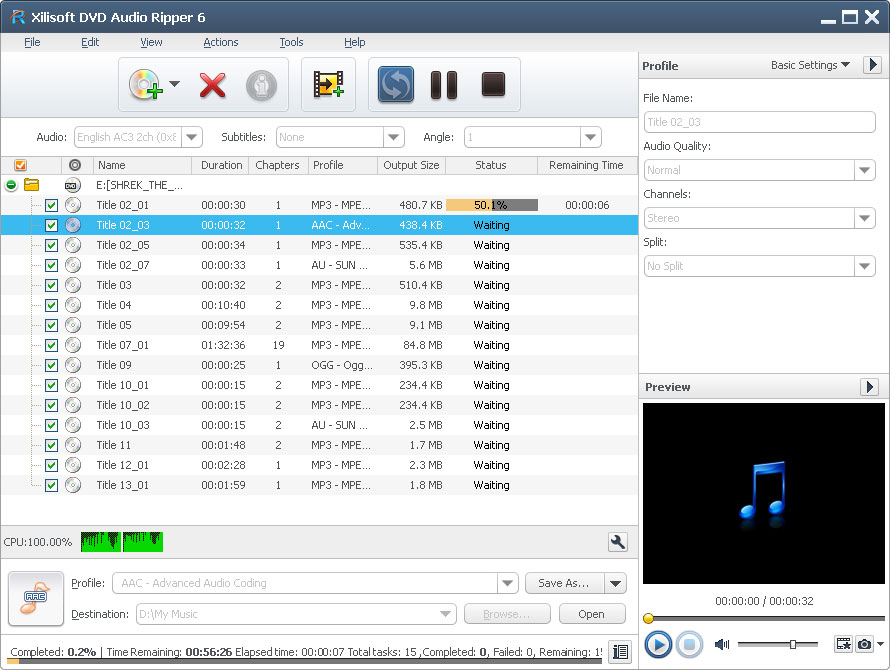
Ever thought of converting a certain dialog from your favorite movie? Or convert music from your choice movies so you can play them on your iPod? Xilisoft DVD to Audio Converter can do the job for you. Numerous popular audio formats from DVD, WMA, WAV, M4A, AAC, AC3 and OGG are supported.
Xilisoft DVD to Audio Converter extracts audio files from DVD; you can even choose which segments to extract. Furthermore, you can preview the video with the built-in player and even take a snapshot of a certain scene. Extracted audio still maintains its high quality.
- Convert Home DVD audio and convert to MP3, WMA, WAV, M4A, AAC, AC3, and OGG
- Customizable audio settings before conversion
- Built-in movie player
- Can't rip/convert DVD with copyright


Safe Download 100% Virus Free

Secure Online Payment

30 Days Money Back Guarantee

Free Customer Service
Customers Also Choose:
Xilisoft iPhone Magic Platinum
Complete solutions to transfer, backup and manage iPhone/iPad/iPod contents, convert videos and download online videos to iPhone/iPad/iPod.
Xilisoft Video Converter Ultimate
Convert common and HD/3D videos in 160+ formats. Merge, clip, split, add video effects, watermark, subtitle, soundtrack, etc to better enjoy it.

Convert DVD to MP3 and other popular audio formats 
Convert DVD to MP3 and all other popular audio formats with high quality
- DVD to Audio Ripper
Extract audio files from DVDs and other videos and save them as MP3, WMA, WAV, M4A, AAC, AC3, and OGG formats. - Get Detailed DVD Info
Users can get all DVD info online like album artwork, album title, artist, producer and more. - High Conversion Speed
The software auto-detects your CPU for dual-core or multi-core CPU to maximize the conversion speed.

Set output preferences for customized files
Set the output manners and customize output file to convert DVD to audio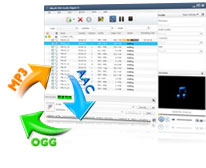
- Customize Output Audio Format
Change general and advanced profile settings to redefine output files or choose from the available profiles. - One Source, Several Output
You can add several audio formats like MP3, or WAV to one source file to get different converted files all at the same time. - Specify Exact Target File Size
Before converting , set a desired file size by calculating the bit rate beforehand with the built-in Bit Rate Calculator. - Convert Audio From a Segment in Video
Set segment start time and duration to convert audio from a video file. - Split a Single File into Several Files
Split several files from one source file; you can even set the split time and file size.

- Add and Edit ID3 Tags
Users can edit the ID3 tags such as files like title, author, album, and genre of audio and video to organize multimedia library. - Take Snapshots
Preview music and video with the built-in resizable player so you can know which time segment to convert audio. - Multithreading and Batch Conversion
Equipped with multithreading and batch conversion, this DVD to MP3 audio ripper is able to convert several DVDs or titles at the same time. - Run in Background
You can do other jobs smoothly while running the DVD Audio Ripper in the background. - Power Management
Easy power management is supported in this DVD audio ripper. - Multiple Interface Languages
Including English, French, German, Japanese, Spanish and Chinese.
| Output Devices Supported | |
| iPod touch 5, iPod nano 7, iPad mini, iPad mini with Retina display, iPad 4, iPhone 5 Android phone: Samsung Galaxy Note II (n7100), Samsung Galaxy S III (i9300), Samsung Galaxy S II (i9100), LG Optimus 4X HD (P880), LG Optimus 2X (P990), HTC DROID DNA (X920), HTC EVO 4G LTE (ONE X), HTC ONE V, Motorola DROID RAZR MAXX HD, Motorola Photon Q, Sony Xperia TL (LT30), Sony Xperia S (LT26), Sony Xperia P (LT22) Google phones: Google Nexus 4 Windows phone: Nokia Lumia 920, Nokia Lumia 820, HTC Windows Phone 8X, HTC Radar 4G, Samsung Focus S |
|
| Input File Formats Supported | |
| DVD-Video, DVD folder, IFO File | |
| Output File Formats Supported | |
| Audio | MP3, WMA, AAC, WAV, OGG, RA, M4A, AC3, MP2, SUN AU Format |
| Image | BMP, GIF, JPEG, PNG |
| OS | Microsoft® Windows 11 / 10 / 8 / 7 / Vista / XP (SP2 or later) |
| Processor | 1GHz Intel/AMD processor or above |
| RAM | 256MB RAM (512MB or above recommended) |
| Free Hard Disk | 100MB space for installation |
| Graphic Card | Super VGA (800×600) resolution, 16-bit graphics card or higher |
| Others | DVD-ROM drive |


