
Xilisoft DVD to Subtitle Converter
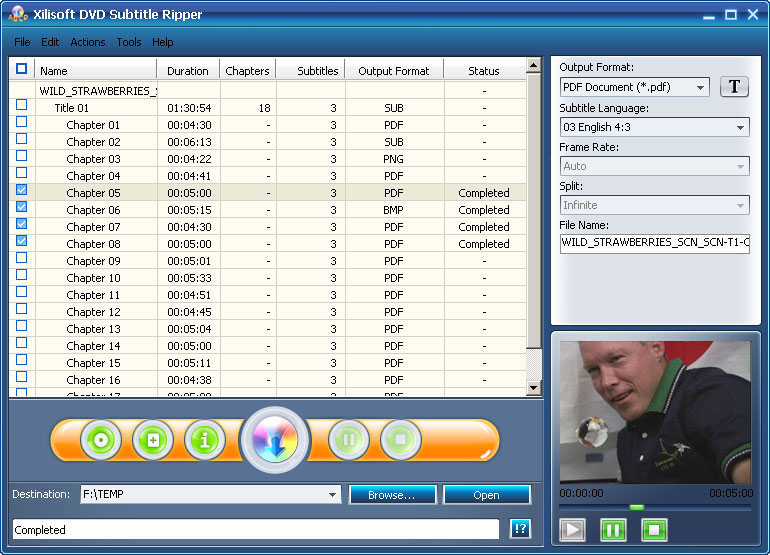
Being a multifunctional Home DVD subtitle extractor to effectively extract subtitles from DVDs, Xilisoft DVD to Subtitle Converter can convert all Home DVD subtitles and create subtitle files in IDX+SUB, PDF, JPG and other image formats. Besides extracting subtitles from DVD-Video, this Home DVD subtitle extractor/maker tool can also extract subtitles from VOB and SUB+IDX files.
Developed to bring you an easy and high-efficient way to convert Home DVD subtitle, this Home DVD subtitle extractor allows you to output multilingual subtitles file to facilitate your language learning greatly, retrieve Home DVD information from the Internet, separate Home DVD subtitles into several parts, and so on. For movie fans like you, Xilisoft DVD subtitle converter provides a brand-new way to review your favorite movie stories.
- Convert subtitles from DVD-Video
- Convert subtitles from VOB/SUB files and save as PDF, JPG or other image format
- Extract subtitles from Home DVD and output multilingual comparison subtitle files
- Can't rip/convert DVD with copyright

Safe Download 100% Virus Free

Secure Online Payment

30 Days Money Back Guarantee

Free Customer Service
Customers Also Choose:
Xilisoft iPhone Magic Platinum
Complete solutions to transfer, backup and manage iPhone/iPad/iPod contents, convert videos and download online videos to iPhone/iPad/iPod.
Xilisoft Video Converter Ultimate
Convert common and HD/3D videos in 160+ formats. Merge, clip, split, add video effects, watermark, subtitle, soundtrack, etc to better enjoy it.

Convert separate or multilingual DVD subtitles 
Extract DVD subtitles and output single or multilingual comparison subtitle file
- Extract DVD subtitles from DVD-Video
Convert DVD subtitles from the whole DVD or convert subtitles by DVD titles or chapters, and output them in PDF, SUB+IDX, JPG, BMP, PNG format. - Extract subtitles from VOB/SUB files
Convert all or some of language subtitles from VOB and create SUB+IDX subtitle files or output as PDF, JPG, BMP, PNG; extract subtitle file from SUB+IDX file and save as PDF, JPG or other picture format. - Multilingual subtitles comparison
Output multilingual subtitle comparison files from DVD-Video to benefit your language study. - Get disc information
Perfect your DVD movie information in the way of retrieving film name, director, actors/actresses, title and chapter info of DVD from the Internet.

Optional DVD subtitle output
Various output options to individualize your DVD subtitle output freely- Various output formats
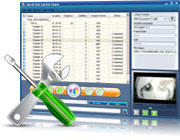
Extract subtitle from DVD, VOB, SUB+IDX and then output as PDF, SUB+IDX, JPG, BMP, PNG file. - Flexible subtitle converting
Convert DVD subtitles of the whole DVD-video; convert DVD subtitles of all titles and chapters or some of them; convert all language subtitles or some of them; convert different language subtitles respectively or as a single multilingual subtitle comparison file. - Subtitle font settings
Setting smaller font makes it possible to put more subtitles in one page for convenient carrying, while setting bigger font makes the subtitles easier to read. - More output options
Split output files by given time, choose appropriate frame rate and name the subtitle files to extract subtitle from DVD-Video conveniently.

Get 100% accurate subtitles in A4 size
Convert optimal-sized DVD subtitles with the best experience and easiest way
- Output A4-sized subtitle files
Typeset the subtitles in A4 page size and output PDF files or image files to make your reading and printing easier. - 100% accurate subtitle
Directly grab DVD subtitles accurately with no mistakes and output subtitle files absolutely accordant to the original subtitles. - Easy to use
The whole DVD subtitle converting process can be done in 3 steps: load DVD, select output format (default to PDF) and start to convert DVD subtitle. - More handiness
Start, pause and stop the DVD subtitle converting process at will; preview the source files; choose skin and language to dress your product interface; and more.
| Input File Formats Supported | |
| DVD-Video, DVD folder, IDX+SUB, VOB | |
| Output File Formats Supported | |
| IDX+SUB, PDF, PNG, JPEG, BMP |
| OS | Microsoft® Windows 11 / 10 / 8 / 7 / Vista / XP (SP2 or later) |
| Processor | 1GHz Intel/AMD processor or above |
| RAM | 256MB RAM (512MB or above recommended) |
| Free Hard Disk | 30MB space for installation |
| Graphics Card | Super VGA (800×600) resolution, 16-bit graphics card or higher |
| Others | DVD-ROM drive |


